
Business & AI · AI Implementation System
WORK LESS, EARN MORE WITH AI
The Small-Business AI Implementation System
Stop starting the same business tasks from scratch.
Turn recurring emails, follow-ups, notes and admin into repeatable AI-assisted processes — with clear human review built in.
Instant PDF download · 57-page digital implementation workbook · Practical worksheets and fill-in pages
Individual results vary. No income, time savings or business outcome is guaranteed.
Current Edition Guarantee: Your purchase includes the current edition. When material updates are released, existing buyers will be notified of available update options.
This 57-page implementation workbook gives you the worksheets, decision rules, prompts, examples and five workflows to decide what AI should handle, build one useful process and reuse what works.
The method is already organized for you. You bring your business and one repetitive task.
See how it works
One repetitive task, start to finish.
This is the lead follow-up workflow from the workbook, run once. Illustrative example — not a customer result.
01 · Rough input
“Called back the office block on Mill St. 3 floors, want weekly clean, evenings after 6, they asked about window cleaning too, budget sounded tight, decision next week.” Messy notes, typed straight after the call.
02 · Workbook method
Open the lead follow-up workflow. Defined inputs, fixed steps, one review point, a known finished state. Brief the AI with the six-part prompt framework: role, context, task, input, format, constraints.
03 · AI-assisted draft
A short follow-up email back: thanks for the call, a summary of what was discussed, evening access noted, window cleaning listed as a separate optional line, and a next step with a date.
04 · Human review
Standard oversight, because it leaves your business. You confirm the scope, access times and next step against your original notes. If information such as pricing wasn't supplied, it stays out of the draft rather than being guessed.
05 · Usable result
One reviewed follow-up email, ready to send while the conversation is still fresh.
06 · Reuse next time
The prompt that worked goes into your own prompt library, and the workflow is written down in your words. Next enquiry, you run it — you don't rebuild it.
Illustrative example — not a customer result. No specific time saving, income or outcome is promised.
Worked example
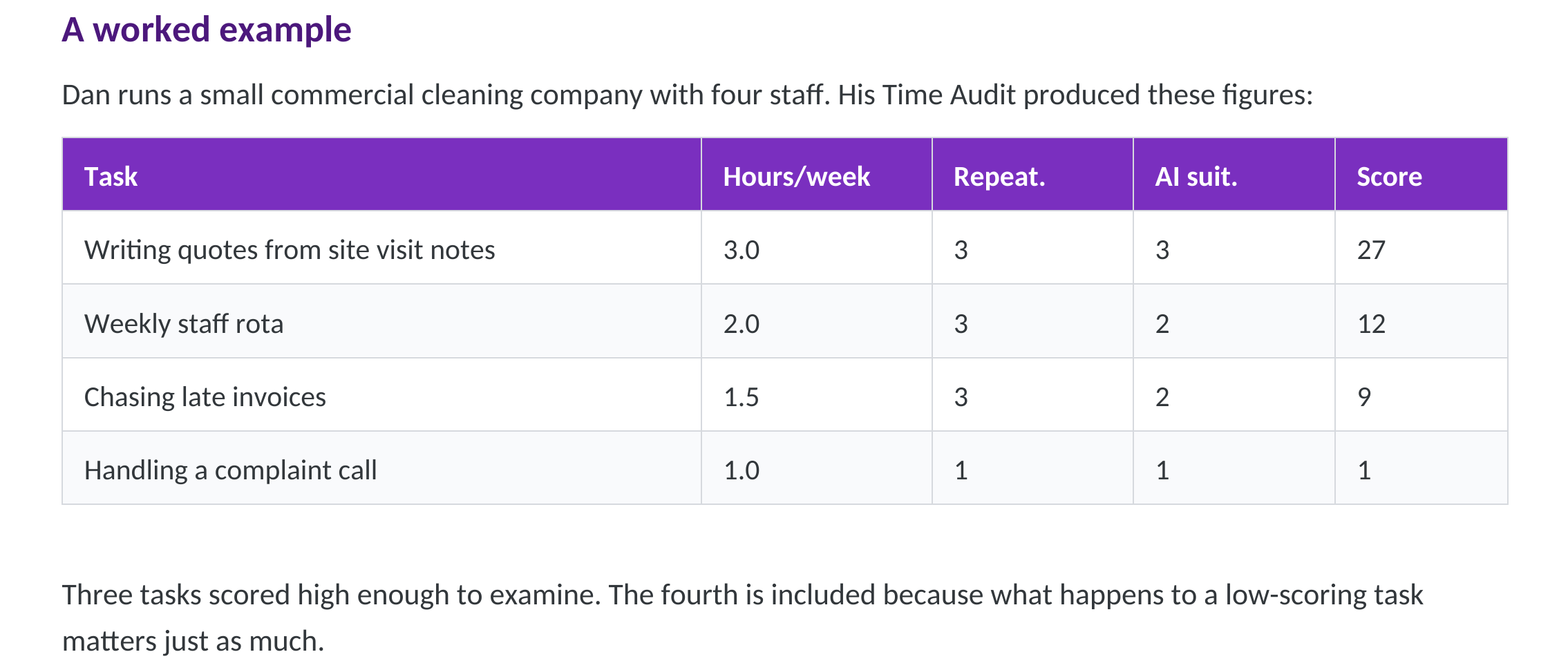
Dan runs a small commercial cleaning company with four staff.
Four repetitive tasks, scored with the workbook. Four different answers — the method does not tell owners to automate everything.
| Task | Hours/week | Score | Decision |
|---|---|---|---|
| Quotes from site visit notes | 3.0 | 27 | Workflow · Full review |
| Weekly staff rota | 2.0 | 12 | Assist · Standard review |
| Invoice reminders | 1.5 | 9 | Assist · human send decision |
| Complaint call | 1.0 | 1 | Keep Human |
Quotes → Workflow, full review.
Messy notes, but the quote structure never changes. Because a quote carries a price, he checks the figures and scope himself every time.
Staff rota → Assist, standard review.
Staff have circumstances a rota can't see. He finishes it himself.
Invoice reminders → Assist, human send decision.
His strongest automation candidate, run manually first — a chase sent to a client who paid yesterday costs more than the minutes it saves.
Complaint call → Keep Human. Permanently.
A client who's had a bad experience needs a person who takes responsibility.
Four tasks. Four different answers. None reached by guessing.
What will I actually do?
Start with one real task
Five steps, worked through on paper. The 30-Day Plan assumes 30–60 minutes a week — this is deliberate work, not an instant result.
Find it
Identify which repetitive work is consuming your week.
Decide
Determine what AI can assist with and what stays human.
Build it
Turn one task into a repeatable process.
Check it
Review the output before it reaches customers.
Reuse it
Save what works instead of starting over next time.
The problem / reframe
Most AI advice for business owners starts with tools. This one starts with your week.
You have probably already tried. An account you've used a handful of times. A prompt list saved somewhere. An article about the eleven tools you should be using.
Tool-first advice asks you to guess. You hear a tool is good, you try it on whatever happens to be in front of you, and you hope something useful comes of it. Sometimes it does. More often it costs an evening and changes nothing.
Prompt lists have the same problem in a smaller package. A prompt is only useful once you've decided which task deserves one.
The question isn't which AI tool should I use. It's which parts of my business should AI touch — and which parts should stay exactly where they are.
This workbook starts with your actual week, on paper, before you choose anything.
Show the system
Ten stages. Each one produces a decision you can act on.
AI Time Audit
Every task you repeat, with the hours it actually takes. You finish with a written baseline.
Opportunity Score
Each task gets a number, so the list ranks itself.
Your Top 3
The three highest-scoring tasks carry forward. The rest stay on the page for next time.
Assist / Workflow / Automate / Keep Human
Four questions sort each task into the kind of help it needs. Only two involve handing work over.
Oversight level
Light, Standard or Full — decided before anything leaves your business.
AI Stack Decision Guide
Now you choose tools. Your classification points to the two or three that fit, with ten plain-English tool summaries.
Prompt framework + Your First Hour
A six-part structure for briefing AI, a diagnosis table for when output comes back wrong, then one session on one real task.
Five complete workflows
Defined inputs, a review point, a finished state: lead follow-up, meeting notes, content, monthly finance review, repetitive admin.
The 30-Day Plan
Four weeks, one focus each, with the key task starred.
Measurement + AI Business Blueprint
Re-run the audit, compare to your baseline, and put everything you decided on one page.
Opportunity Score
Score every repeatable task in your week. Then act on three.
Each task gets three numbers:
- Hours per week — the time it actually takes.
- Repeatability, 1–3 — from different every time to the same every time; you could hand someone a checklist.
- AI suitability, 1–3 — from depends mainly on relationship, judgement or physical presence to mostly reading, writing, sorting or summarising.
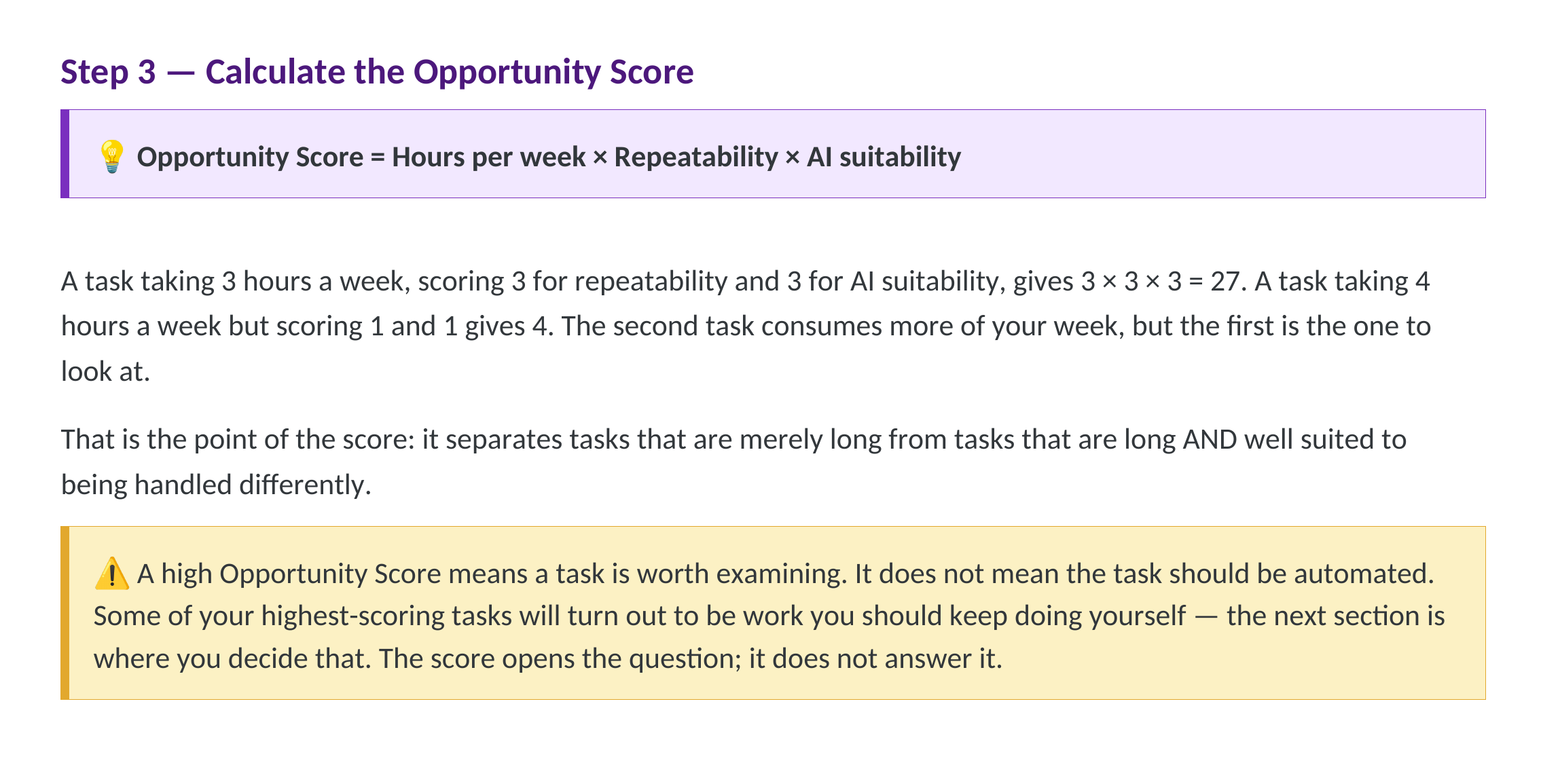
Opportunity Score = Hours per week × Repeatability × AI suitability
A task taking 3 hours a week, scoring 3 and 3, scores 27.
A task taking 4 hours a week, scoring 1 and 1, scores 4.
The second consumes more of your week. The first is the one to look at.
That's the point of the score: it separates tasks that are merely long from tasks that are long and well suited to being handled differently.
One caution, taken directly from the workbook:
A high Opportunity Score means a task is worth examining. It does not mean the task should be automated. Some of your highest-scoring tasks will turn out to be work you should keep doing yourself.
The score opens the question. The next stage answers it.
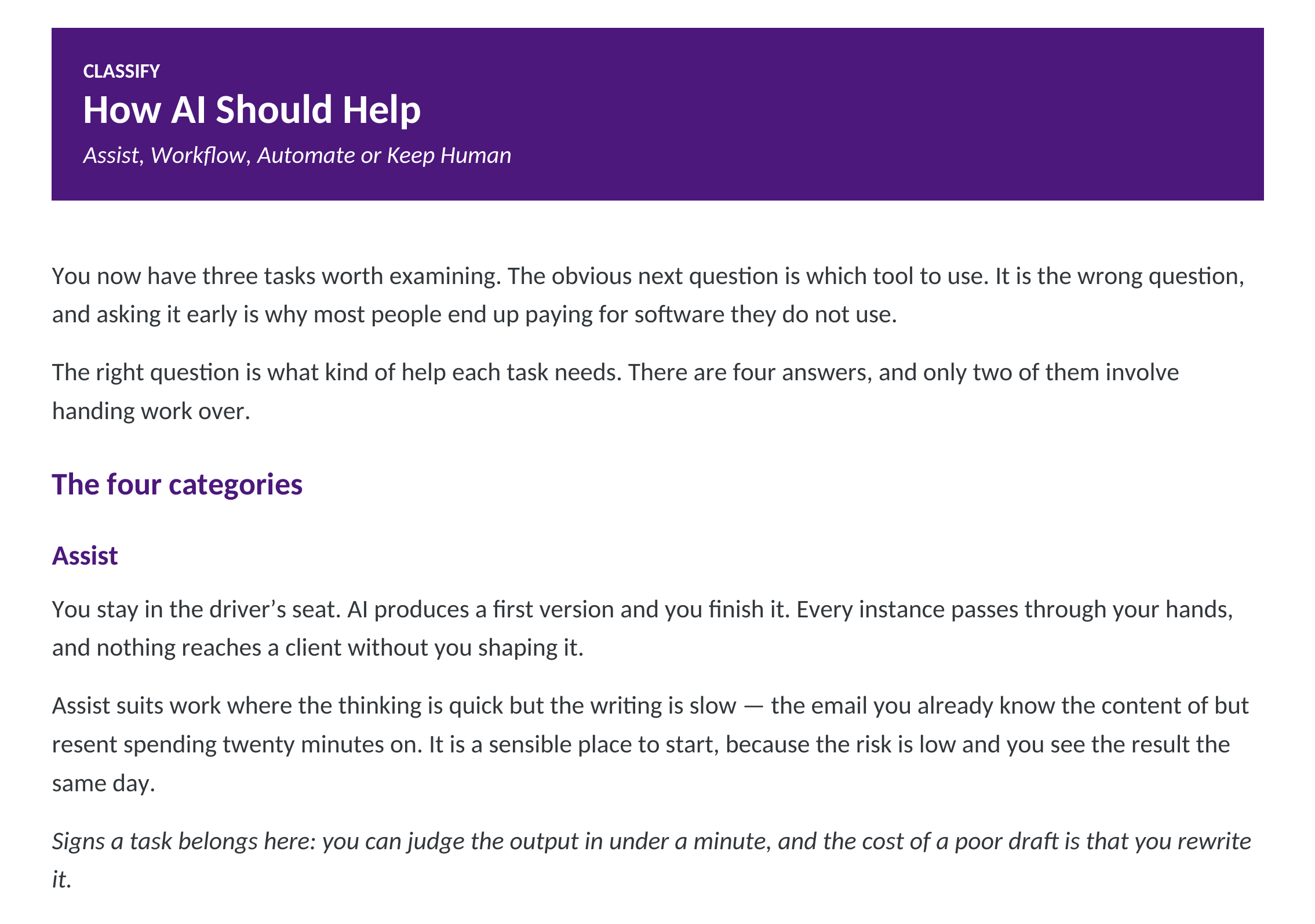
Classification
What kind of help does each task need?
Four categories. Only two involve handing work over.
ASSIST
AI produces a first version and you finish it. Every instance passes through your hands. Suits work where the thinking is quick but the writing is slow — low risk, and you see the result the same day.
WORKFLOW
A repeatable sequence you run deliberately: defined inputs, fixed steps, a review point, a known finished state. You still start it each time, but you stop reinventing the process. Five complete examples are included.
AUTOMATE
The task runs without you initiating it. The workbook is explicit that automating something you haven't first run manually as a Workflow risks confident, incorrect output arriving on a timer.
KEEP HUMAN
You do it. Not because AI couldn't produce something, but because producing something isn't what the task requires. Work belongs here when it depends on a relationship, when it requires professional judgement you're accountable for, when the consequence of being wrong is serious, or when the value is in a person having considered it.
Some of your highest-scoring tasks should stay exactly where they are.
This category is not a list of failures. It's the part of your business your clients are actually paying for.
Naming these tasks deliberately protects them. A line that is never written down is easier to cross by degrees. So the workbook gives you a page to write them on, and the 30-Day Plan asks you to review the list in Week 2.
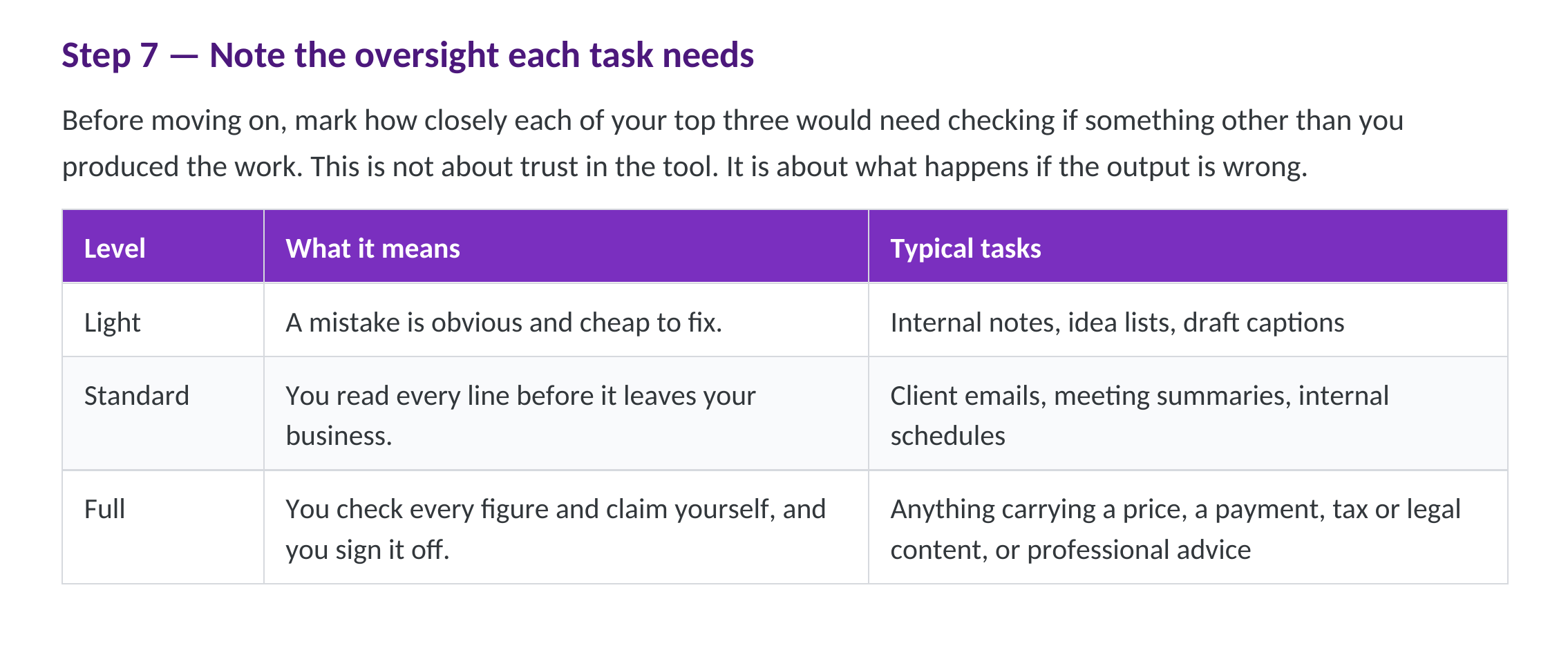
On everything else: an oversight level, decided in advance.
Light — A mistake is obvious and cheap to fix. Internal notes, idea lists, draft captions.
Standard — You read every line before it leaves your business. Client emails, meeting summaries, internal schedules.
Full — You check every figure and claim yourself, and you sign it off. Anything carrying a price, a payment, tax or legal content, or professional advice.
A task needing Full oversight can still benefit from AI. It simply never runs unattended, and the judgement stays yours.
What you'll build
What you'll have when you're finished
Not notes. Completed decisions, written down.
A written baseline — total hours per week across your repeatable tasks, dated.
A ranked task list — scored, not guessed.
Three tasks classified — Assist, Workflow, Automate or Keep Human, each with a first action.
An oversight level on every one — decided before anything runs.
A permanent Keep Human list — the boundary of the system, on the page, so it stays decided.
A tool decision you can defend — one assistant you use daily, and at most a second doing one specific job.
One working process — a workflow you've built, adapted, run twice, and written down in your own words.
A prompt library of your own — the prompts that actually worked for your business, in one file.
A measured result — the same hours, re-counted at the end, against the number you started with.
Your AI Business Blueprint — one page holding all of it, updated every 30 days.
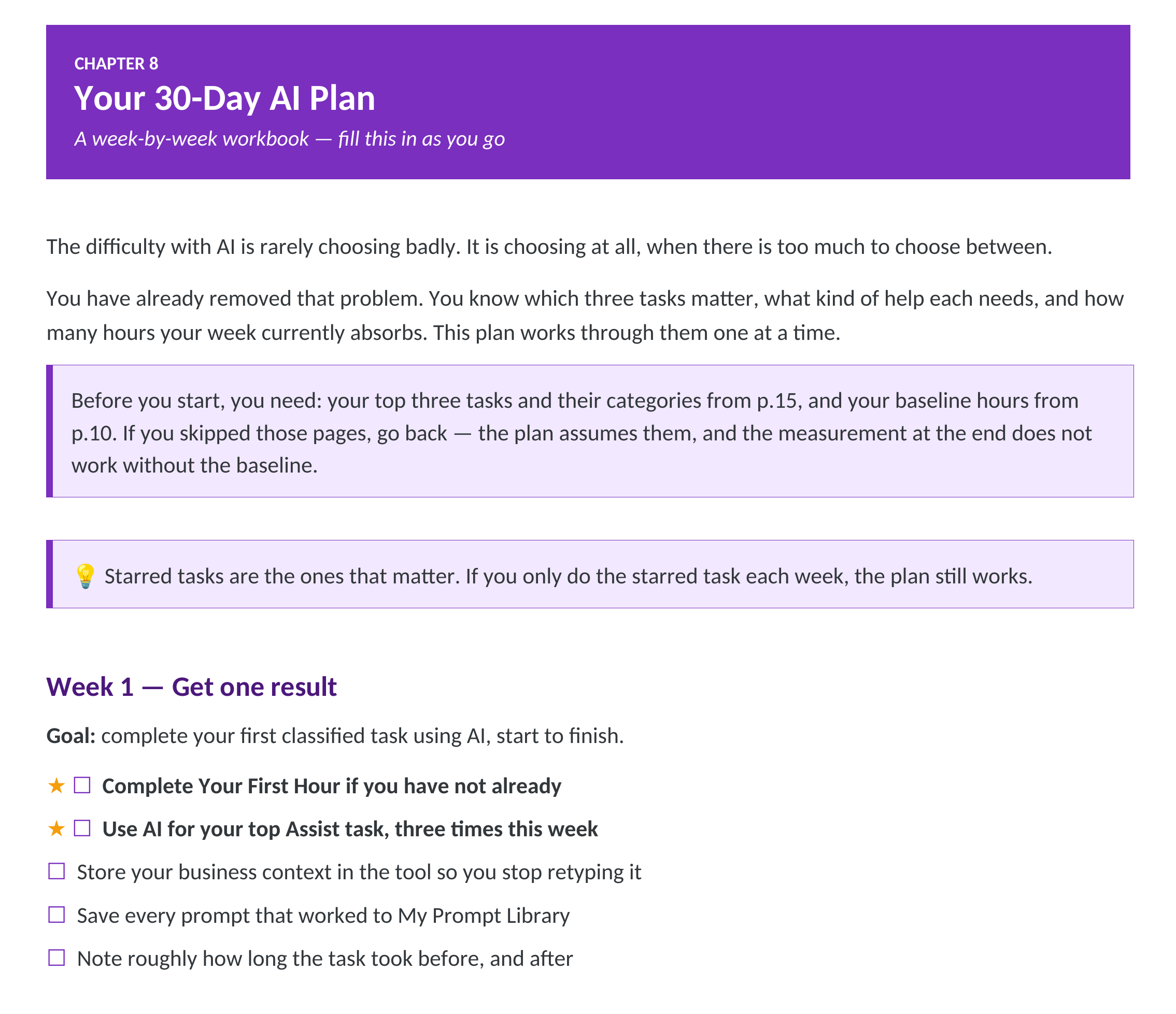
The 30-Day Plan
The workbook tells you what to do next. That's the design.
Four weeks, one focus each, with the key task starred — so if you only do the starred task that week, the plan still works.
Week 1 — Get one result.
Complete Your First Hour. Use AI on your top Assist task, three times. Store your business context so you stop retyping it. Note how long the task took before, and after.
Week 2 — Go deeper on one tool.
Same tool every working day. Find out what else it does. Apply the Two-Round Rule deliberately. Review your Keep Human list — has anything drifted across the line?
Week 3 — Build one workflow.
Follow one of the five end to end, on real work. Adapt it. Run it a second time and note what changed. One workflow built properly is the whole of Week 3.
Week 4 — Measure and decide.
Re-run the audit on those three tasks. Compare to your baseline. Complete your Blueprint. Choose the next priority. Deliberately lighter than the other weeks.
Every week has capture fields to fill in. There's also a page for what happens if you fall behind — because you might, and a plan that pretends otherwise isn't a plan.
Then you run it again, from a better starting position.
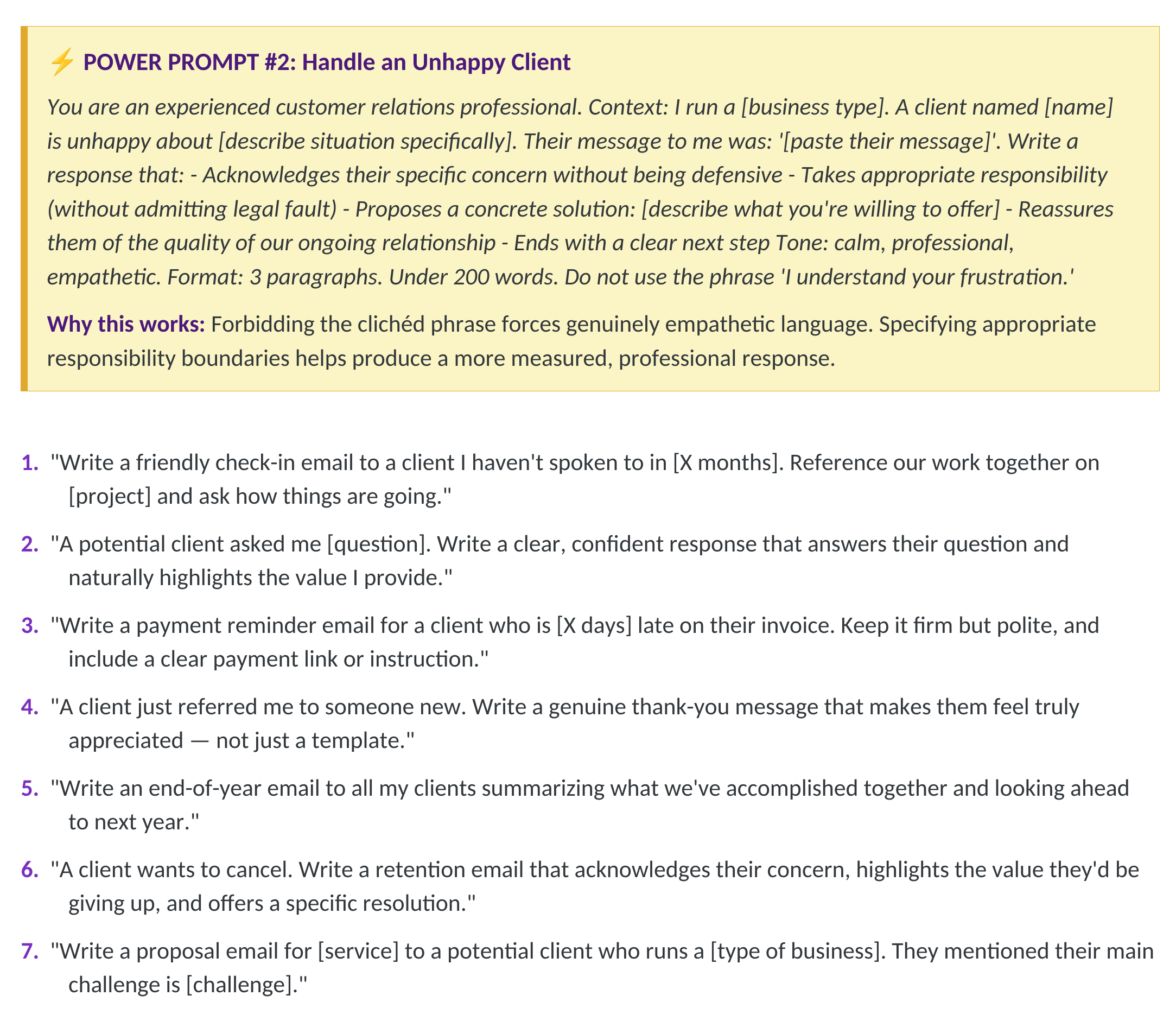
Also included
35 ready-to-use prompts and 10 Power Prompts — at the back, on purpose.
The library sits after the decision system. That ordering is deliberate: a prompt is worth having once you know which task deserves one.
35 prompts organised by business function — client communication, marketing and content, business operations, finance and admin.
10 Power Prompts, marked separately. Expanded versions with role, context, format and constraints written in, for the jobs worth getting right first time — new-client onboarding, an unhappy-client response, a discovery call script, a client report template, a business proposal. Each includes a short note on why it works, so you can write your own the same way.
The library is deliberately shorter than it could be. Prompts producing roughly the same output as another were removed rather than reworded, because a library you can read through is more useful than a library you scroll past.
Who this is for
This is for you if you are:
- A small-business owner or solopreneur
- A freelancer or independent consultant
- A service provider — bookkeeper, accountant, lawyer, coach
- A contractor, tradesperson or local business owner
- A real estate agent or property manager
- A marketing consultant or agency owner
- A creator or online business owner
- Someone who feels overwhelmed or left behind by AI
Who this is not for
This is probably not for you if:
- You want a list of tools to try rather than a decision about your own business
- You want AI to run your business without you reviewing anything
- You're looking for income claims or guaranteed results — there are none here
- You'd rather read about AI than work through worksheets
You need: a computer and internet connection, 30–60 minutes a week, one real task to work on, and about an hour to begin.
Nor Fin Studio
Why this exists
Nor Fin Studio builds practical business tools for people who run businesses, not for people who follow technology.
This workbook exists because there is a great deal of material explaining what AI can do, and very little helping a business owner decide what it should do in their particular week — or what it shouldn't touch at all.
So the structure runs in the order we think is the honest one: measure first, score second, classify third, choose tools fourth.
No income promises. No guaranteed time savings. Every time estimate inside is described as illustrative, and every tool summary tells you to check current features and pricing with the provider directly, because those change.
Price + CTA
$37
Instant digital access.
You finish with a written baseline, three classified tasks, an oversight decision on each, a permanent Keep Human list, a tool decision, one workflow you've built and run, a measured result, and a one-page Blueprint you update every 30 days.
That's what you're buying. Not information about AI — a decision about your own business, and the record of it.
Instant access. Begin the Time Audit today.
Digital Product Policy. This is a digital product delivered immediately after purchase. Because access is provided upon purchase, all sales are generally final. If you experience a technical issue accessing your purchase, please contact us and we'll help resolve it. See the Refund Policy for details. This policy does not limit any rights you may have under applicable law.
Current Edition Guarantee: Your purchase includes the current edition. When material updates are released, existing buyers will be notified of available update options.
Honest comparison
Could I build something like this myself with ChatGPT?
You can use ChatGPT or another AI assistant to help you think through individual tasks.
What you're paying for here is the prepared implementation system: the audit, scoring method, decision rules, oversight framework, worked examples, reusable prompts, five workflows and 30-day implementation sequence are already organized so you don't have to design and quality-check the process yourself before you begin.
The AI tool still does the AI work. The workbook gives you the method for using it deliberately in your business.
FAQ
Questions
Final
You don't need to know everything about AI.
You need to know which three tasks in your business are worth changing, what kind of help each one needs, and which work stays yours.
That's a decision — and decisions are easier to make with a method than with a feeling at the end of a long week.
Work through it in order. Write the number down. Build one thing that works.
Then run it again.
Instant PDF download · 57-page digital implementation workbook · Practical worksheets and fill-in pages